
TrustX provides voice fraud detection and biometric authentication capabilities. This guide helps customers get started with integrating and deploying TrustX Voice solutions.
Choose the integration path that best matches your goal:
Path | Purpose | Audio Source | Who Drives It |
|---|---|---|---|
1. Production deployment | Analyze live customer calls for clone, replay, and synthetic voice detection (xDeTECH), with optional voice enrollment, authentication, and fraud (1:N) checks. | Live audio streamed from the customer’s voice infrastructure via SIPREC or AudioHook | Customer SBC/CCaaS platform, with the customer backend calling TrustX REST APIs |
2. TrustX back-office emulation | Demo, test, and validate TrustX Voice flows without a live telephony integration. | Calls emulated through TrustX Backoffice | TrustX Backoffice operator |
3. Programmatic emulation with WAV files | Automate testing and regression using prerecorded audio. | Prerecorded WAV files submitted by a test harness | Customer test harness calling TrustX REST APIs |
This guide also covers optional TrustX features, including push notifications for alternate authentication methods and phone number-based trend lists and watchlists.
Components
Call Processing Service (CPS): Provides APIs to start and stop call processing and retrieve call analysis results while processing is in progress.
VoiceBridge: Provides the audio integration layer for TrustX Voice. It supports SIP/SIPREC, AudioHook, WebRTC, and other protocols for streaming, pushing, or retrieving raw audio from a customer’s Session Border Controller (SBC) or Contact Center as a Service (CCaaS) platform.
Audio Dock (optional): Provides APIs for emulating the audio input that would normally be provided through VoiceBridge. Customers can use Audio-dock to test TrustX Voice without a live telephony integration by supplying prerecorded WAV files as the incoming call audio.
Identity Store (optional): Provides the user repository and APIs used to create and retrieve users, record consent, manage voice biometrics, and retrieve authentication results. Integrations that require only clone, replay, or synthetic voice detection, and do not use voice biometric matching, do not need to use the Identity Store.
Process Manager (optional): Provides APIs to retrieve and act on process instances associated with an orchestrated TrustX workflow, including access to granular results and fraud state. Process Manager is called by CPS as part of call processing. Customers can use the Process Manager APIs when they need more detailed call results or want to initiate additional actions, such as an alternate identity verification or authentication flow, sending a push notification to a registered device, or marking a process instance as fraud.
ARTHR: Issues the API keys and bearer tokens required to authenticate requests to TrustX APIs.
References:
Choosing a Path
Use Path 1 to integrate TrustX Voice with live customer calls.
Use Path 2 to explore and validate voice flows before implementing a telephony or API integration.
Use Path 3 to run repeatable, automated tests using prerecorded audio.
Voice Process Orchestration (All Paths)
See Voice authentication for details on the orchestrated voice flow.
Flow considerations:
Create the user in the Identity Store if the user does not already exist.
Choose the activities required for your call flow:
xDeTECH: Detects synthetic voice, voice cloning, and replay attacks.
Voice enrollment/authentication: Performs enrollment and 1:1 passive voice biometric matching.
Voice watchlist: Performs 1:N voice biometric matching against a fraud watchlist.
Phone number watchlist: Checks the caller’s phone number against configured watchlists.
See Identity Store activities for details on the available voice authentication activities.
If your flow includes voice enrollment or authentication, configure the Identity Store and voice settings before using the flow. See Managing identity stores: voice configuration.
Reference: Identity store activities. If you use enrollment or authentication, configure the identity store and voice settings first: Managing identity stores: voice configuration.
Path 1: Production Deployment with Live Voice Streaming
1.1 Architecture
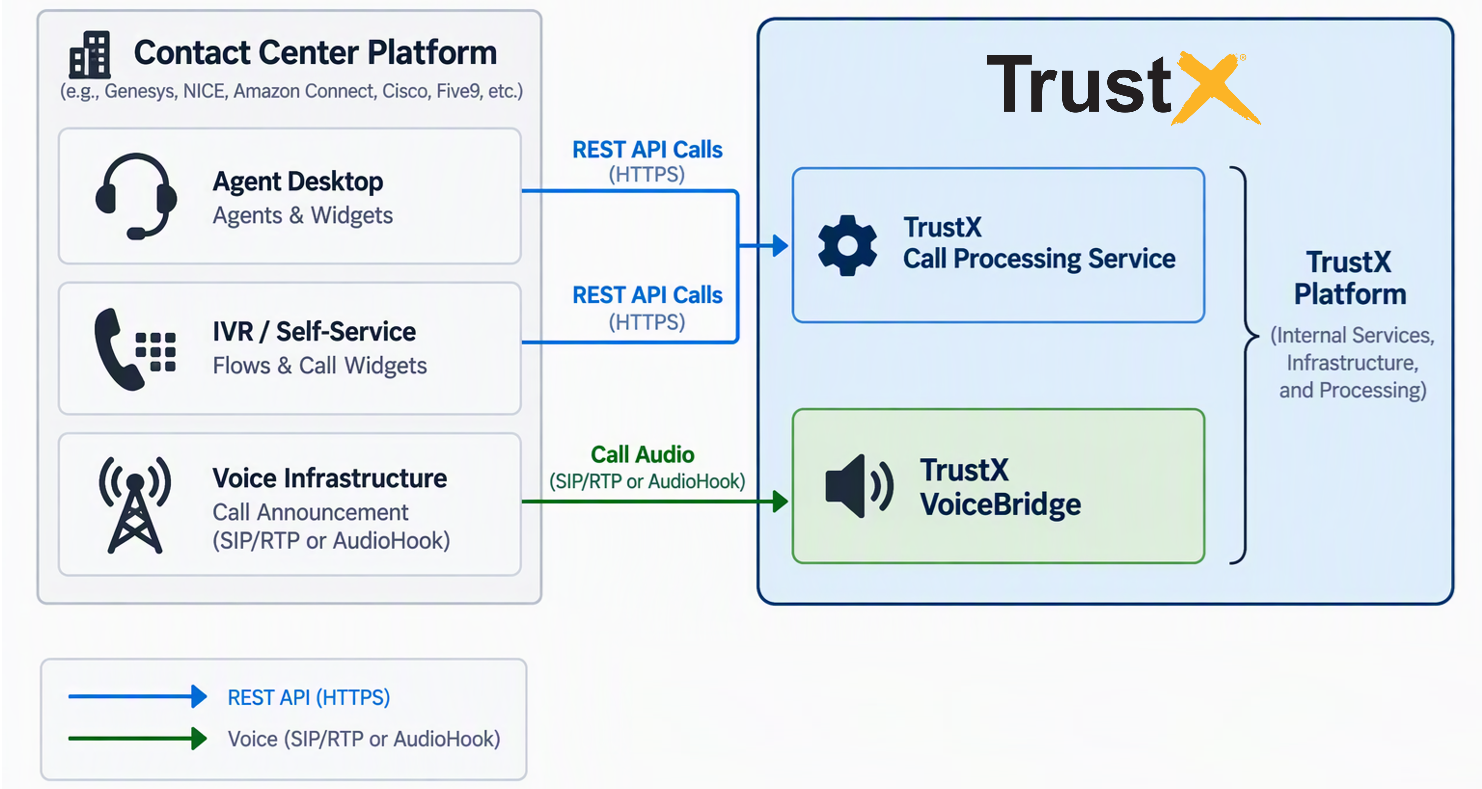
The customer’s SBC or CCaaS platform streams live call audio to TrustX VoiceBridge.
The customer’s backend uses CPS and Identity Store APIs to start call processing, determine enrollment status, and retrieve results.
The customer’s application retrieves the call analysis results from CPS and takes the appropriate action.
Call audio flows through the telephony integration to VoiceBridge. REST API calls carry only identifiers, commands, and results, not call audio.
Call Streaming
Streaming Protocol Options
Option | Description |
|---|---|
SIPREC | Standards-based session recording integration in which the customer’s SBC forks call media to TrustX VoiceBridge as a SIP recording session. |
Audiohook | WebSocket-based audio streaming integration for platforms such as Genesys Cloud. See Configuring Genesys below. |
Kinesis Streams | AWS-based audio streaming integration for Amazon Connect deployments. |
And more... | TrustX VoiceBridge supports additional telephony and contact center integrations. Contact Daon for information about currently supported connectors. |
Prerequisites
Before starting the integration, ensure you have:
A TrustX tenant and Identity Store. See Managing Identity Stores for information on creating and managing new Identity Stores.
A configured voice process definition, identified by tag or name/version. If using push notifications, you also need a configured push process definition.
A telephony or media integration, such as SIPREC or AudioHook, that delivers call audio to VoiceBridge.
A reliable mapping between the contact center conversation and the CPS
callIdused in REST API requests.An API key with least-privilege permissions. See Required API-Key Permissions below.
Call Processing API Workflow
The TrustX APIs allow your backend to perform call-based xDeTECH analysis, passive voice enrollment, voice authentication, suspected-fraud reporting, and device-bound push authentication.
For call-based voice processing, the typical workflow is:
Obtain a bearer token.
Retrieve the CPS call record.
Check the caller’s voice enrollment status when required.
Start the required call processing operations.
Poll CPS for processing results.
Additional workflows use separate Process Manager and Identity Store APIs:
Suspected fraud: Update the fraud state of the process instance associated with the call.
Push authentication: Check whether the user has an eligible appkey, create a process token and process instance, start the configured push process, and poll for the outcome.
Important: A successful request to start processing confirms that the request was accepted. It does not indicate a successful voice authentication, fraud analysis, or push authentication outcome. Retrieve the final processing result to determine the outcome.
Confirm request and response schemas, HTTP status codes, processing status values, permissions, and process behavior against the TrustX API documentation for your environment.
Required API-Key Permissions
Configure the API key in TrustX Backoffice before requesting a bearer token:
TNT#<tenant>#CallProcessingService:*
TNT#<tenant>#IdentityStore:getUserByExtId
TNT#<tenant>#ProcessManager:addProcessToken
TNT#<tenant>#ProcessManager:createProcessInstance
TNT#<tenant>#IdentityStore:listUserAppkeysByExtUserId
TNT#<tenant>#ProcessManager:updateProcessInstanceFraudState
Permission | Use | Required |
|---|---|---|
| Required for CPS call retrieval, starting call processing, and restarting operations. This is a broad permission and should be narrowed to specific CPS permissions where possible. | Yes |
| Required when retrieving the caller from the Identity Store, including checking voice enrollment status before enrollment or authentication. | Enrollment or authentication |
| Required when marking the process instance associated with a call as suspected fraud. | Fraud reporting |
| Used to determine whether the user has an eligible registered appkey. | Push |
| Used to create the process token required for the push workflow. | Push |
| Used to create the push process instance. | Push |
Provision only the permissions required for the workflows enabled by your integration.
Example Values
The API examples in the following sections use these placeholder values:
Base URL:
https://customer.example.trustx.com
Your TrustX tenant URL.Identity Store:
CustomerStore
The configured Identity Store.Call ID:
call-123
An existing CPS call record.Caller ID:
15551234567
The external user ID used to identify the caller in the Identity Store.Agent ID:
15557654321
The value corresponding to CPSmetadata.agentPhoneNumber.Voice process tag:
customer-voice
The configured process definition used for voice processing.Push process tag:
customer-push
The configured parent process definition used for push authentication.
URL-encode path segments and query parameter values as required. Use the same caller external ID consistently across Identity Store lookups, call processing, and push workflows.
Define and apply a consistent phone-number normalization policy in the integrating application rather than assuming TrustX will normalize caller or agent identifiers..
1. Obtain a Bearer Token
Response:
Cache the token server-side using the returned TTL, not the requested TTL. For a 1200-second TTL, refresh about 60 seconds before expiry. Coordinate refresh across concurrent requests. Do not fetch a token for every status poll.
Send this header with each resource request below:
Authorization: Bearer <bearer-token>
Accept: application/json
2. Retrieve Call Context
Illustrative response subset:
Use the agent phone number as agentId in start requests. Identify the caller from trusted context or your identity-selection workflow. Caller phone metadata alone does not establish identity.
3. Check Voice Enrollment
Enrolled User:
A User without voice enrollment has "biometrics": [].
Voice/Passive status ENROLLED or ACTIVE counts as enrolled. HTTP 404 means no matching external user was found. Do not treat other lookup errors as proof that enrollment is absent.
If the user is missing, confirm whether your enrollment process creates the identity or requires prior provisioning.
4. Start Processing
All cases use POST /api/cps/calls/{callId}/start. Do not send both tiEnrol and tiAuth in the same start request.
Case A: xDeTECH Only
No callerId is required. A no-anomaly result does not prove the caller's identity.
Case B: Voice Enrollment With xDeTECH
Confirm consent and identity binding before enrolling. Required speech duration and completion criteria are process-specific; do not hardcode a duration.
Case C: Voice Authentication With xDeTECH
Authentication success comes from the processing result, not the HTTP response to /start.
Start response:
The Process Instance ID may instead come from later CPS status responses. Do not assume it is returned immediately.
To use a process name and version instead of a tag, replace processDefinition with:
{ "name": "CustomerVoiceProcess", "version": 3 }
5. Poll and Interpret Results
Retrieve GET /api/cps/calls/call-123 after starting. The demo polls approximately every 500 ms. For production, agree polling limits with TrustX, avoid overlapping requests, add backoff on transient failures, and stop on application timeout, call end, or a final outcome.
Enrollment
Autentication
xDeTECH
Case | Example |
|---|---|
xDeTECH only, no anomaly |
|
xDeTECH anomaly |
|
Enrollment completed |
|
Authentication matched |
|
Authentication did not match |
|
Processing error |
|
The listed cases are not an exhaustive status list. Interpret each requested action independently:
COMPLETEwithout a successful authentication outcome must not grant access.Missing, unknown, pending, or error results must not be treated as success.
Call
status,audioProcessingStatus, and processstatusremainIN_PROGRESSeven after enrollment or authentication completes. Once the call is terminated, call status changes to"status": "TERMINATED".Missing action objects,
falsestart-request flags, and xDeTECHNOT_PROCESSEDdo not establish success or failure. Wait for the relevant action result within a bounded deadline.Do not infer a universal score direction or compare scores across policies. Use the documented action result and tenant policy.
completedDtmcan be null on a no-anomaly result.
For enrollment, keep refreshing the external-user lookup until Voice Passive enrollment is confirmed or your enrollment timeout expires. A partial enrollment is not an enrolled voice biometric.
6. Mark Suspected Fraud (Optional)
Use the process identifier associated with the call to mark its process as suspected fraud through ProcessManager:updateProcessInstanceFraudState. TBD: add request example and confirm with TrustX.
7. Send a Device-Bound Push Notification (Optional)
Push uses a separate sequence.
Check Appkey Eligibility
An empty array or HTTP 404 means push is not enabled for this user. A non-empty array enables push. Keep returned appkey material server-side. Recheck eligibility immediately before sending.
Create a Process Token
Response:
parameters.externalIDmust match the appkey lookup ID.To reference the push process by name and version instead, use
processDefnNameandprocessDefnVersion.Generate a new UUID-based name for each deliberate send. Validate that the response contains an ID.
Create the Push Process Instance
Response:
Creating the instance is not the same as starting the push process.
Start the Push Process
Response:
Send an empty JSON object, not an absent body. Read the polling URL from variables.activityConfig.pollingUrl and the timeout from timeoutInSeconds. The push process behaviour is process-specific; confirm that your process sends the intended notification and supplies this polling contract. A successful start response is not proof of device delivery or user confirmation.
If the start request times out or loses its response, the process may already be running. Do not automatically create and start another push. Reconcile first.
Poll the Push Outcome
Validate the polling URL before use: require HTTPS, your tenant host, and the expected path. Do not follow arbitrary URLs. Treat polling keys as sensitive.
GET /api/identity-store/cpistatus/poll?key=sample-poll-key HTTP/1.1
Authorization: Bearer <bearer-token>
Accept: application/json
Illustrative responses over time: { "status": "PENDING" }, then { "status": "COMPLETE_SUCCESS" }.
Other final outcomes: COMPLETE_FAILED, legacy COMPLETE_FAILURE, and TIMED_OUT. Poll approximately every 500 ms, within agreed service limits and a bounded deadline based on the configured process. A network failure or client-side deadline does not prove that the underlying process failed or stopped.
Stop the submission sequence on any error. There are no automatic rollback calls, so failed setup can leave unused tokens or instances. Do not send concurrent pushes to the same caller.
Path 2: TrustX Backoffice Emulation
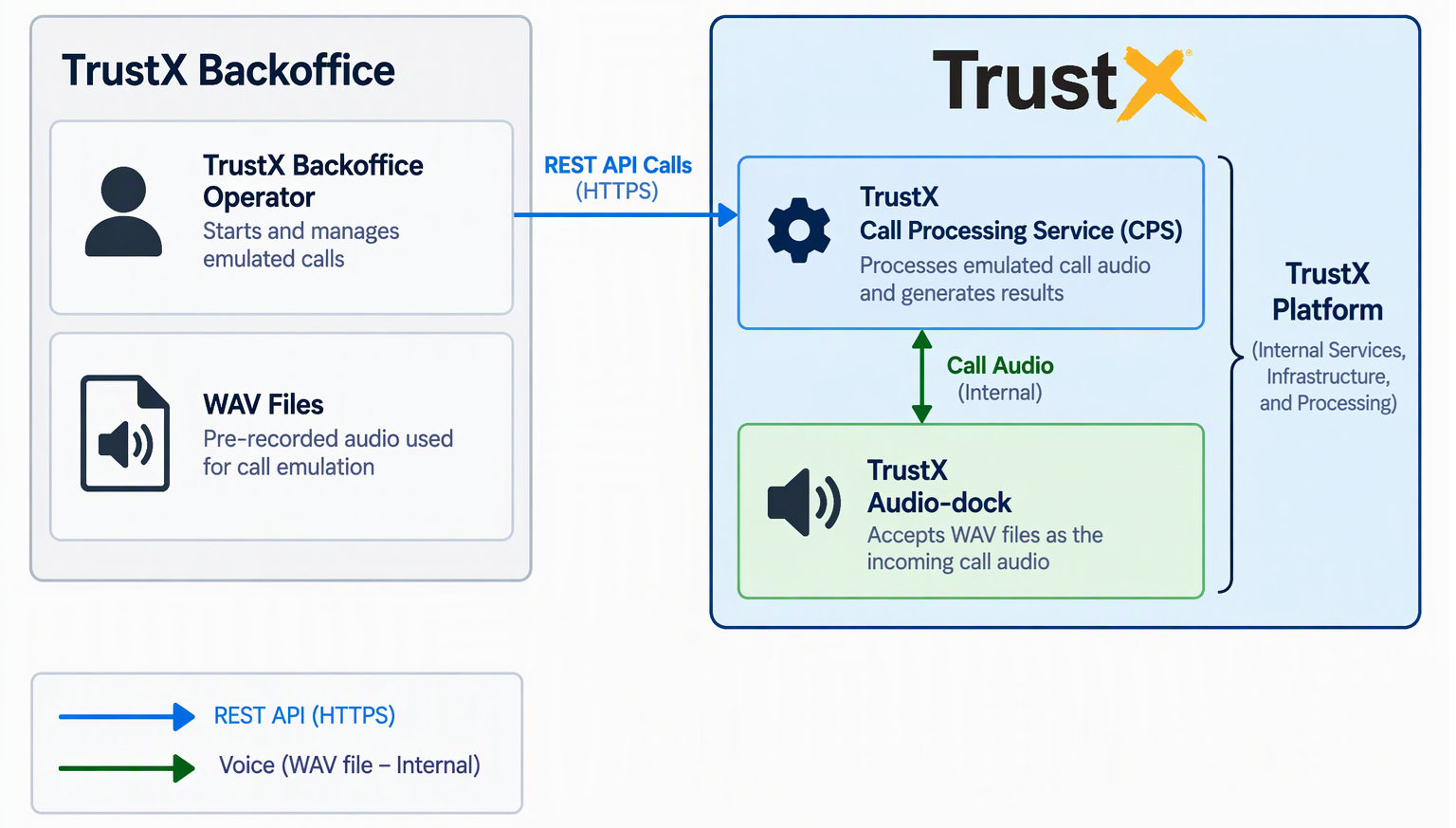
Use TrustX Backoffice call emulation to run and evaluate a voice flow without a live telephony integration. For detailed instructions, see Voice Call Emulation - TrustX.
Use this path to:
Validate voice process and Identity Store configuration.
Review xDeTECH, voice enrollment, and authentication results before building a live integration.
Demonstrate the end-to-end voice flow to stakeholders.
Limitations:
Emulation runs entirely within TrustX and does not exercise the customer’s SBC, CCaaS platform, or live audio integration.
Prerecorded WAV files are used in place of live, streamed call audio.
Overall results should be consistent between runs; however, the same WAV file may produce small variations in scores or processing times depending on when call analysis is initiated in TrustX Backoffice.
Path 3: Programmatic Emulation with Existing WAV Files
Use programmatic emulation to test TrustX Voice using prerecorded WAV files in place of live, streamed call audio. This approach is suitable for automated testing, regression testing, and repeatable execution of known audio samples.
Results should generally be consistent across executions. However, the same WAV file may produce small variations in scores or processing times depending on the timing of the CPS call that starts analysis and the Audio Dock execute request relative to audio playback.
Voice Call Processing via APIs
To process a prerecorded WAV file through the TrustX Voice APIs:
Upload the WAV file to Audio Dock.
Create a source for the uploaded audio.
Execute the source to begin audio playback and call processing.
Audio Dock handles the underlying audio streaming through VGS, allowing prerecorded call audio to be processed without a live telephony integration or direct integration with VGS.
The following sections describe the APIs required to perform each step.
Audio Dock APIs
Audio Dock uses Amazon S3 to store and retrieve audio sources used for call emulation.
Audio requirements: WAV, 16-bit, 8 kHz, mono.
Before beginning integration testing, provide Daon with a representative sample of the audio files you intend to use. Daon can review the audio quality and provide guidance on expected voice processing accuracy.
1.1 Request an upload URL
Call the Audio Dock /upload API to obtain an Amazon S3 presigned URL for uploading the WAV file.
Permission: TNT#{tenantId}#SkyAudioDockService:uploadAudioFileContents
Example Response:
The response provides:
audioFilePresignedUrl: The presigned Amazon S3 URL used to upload the WAV file.audioFileUploadId: The identifier for the uploaded audio file.requiredHeaders: The HTTP headers that must be included when uploading the file to S3.
1.2 Upload the WAV to S3
Upload the WAV file directly to Amazon S3 by sending an HTTP PUT request to the returned audioFilePresignedUrl.
Include all headers returned in requiredHeaders exactly as provided.
Do not include the Audio Dock bearer token in this request. The presigned URL provides the authorization required to upload the file to S3.
Add each header returned in requiredHeaders to the request.
Upload via API Call
To perform upload using an API, follow the steps outlined below:
Set the method to PUT.
Set the URL to the returned
audioFilePresignedUrl.Select Body > binary and choose the WAV file.
Add
Content-Type: audio/wav.Add all headers returned in
requiredHeadersfrom the/uploadresponse.Do not add the Audio Dock bearer token.
Do not hard-code the S3 headers or their values. Always use the requiredHeaders returned by the /upload API because the required headers and values may vary between requests or environments.
1.3 Create the audio source
After uploading the WAV file, create an Audio Dock source that references the uploaded audio.
Permission: TNT#{tenantId}#SkyAudioDockService:addAudioSource
Example Request:
sourceName: A unique name for the audio source within the tenant. Maximum length: 100 characters.audioFileUploadId: The identifier returned by the/uploadAPI for the WAV file uploaded in the previous step.sipMetadata: Optional SIP metadata to associate with the audio source.
1.4 Start Call Processing and Analysis
Execute the audio source to start streaming the prerecorded audio and initiate TrustX call processing.
Permission: TNT#{tenantId}#SkyAudioDockService:executeAudioSource
Example Request:
Process definition
processDefinitionInfo is required and identifies the TrustX Process Definition to use for call processing. The Process Definition must already be configured in the TrustX environment.
Specify the Process Definition using either:
nameandversion, ortag
Do not specify both.
Operations to start
Use operationsToStart to specify the voice operations to perform:
xDeTech: xDeTECH analysis.tiAuth: Voice authentication.tiEnrol: Voice enrollment.
tiAuth and tiEnrol cannot be used in the same execution.
Caller ID and Identity Store users
For voice authentication, callerId must correspond to an external ID for an existing user in the Identity Store.
For voice enrollment, behavior depends on whether the Voice Enrollment activity is configured with createUser enabled:
User exists and
createUser = false: Enrollment is performed for the existing user.User exists and
createUser = true: The request results in a User already exists error.User does not exist and
createUser = false: The request results in a User not found by external ID error.User does not exist and
createUser = true: A user is created using the supplied external ID and enrollment is performed for the new user.
If necessary, retrieve the user by external ID before starting processing to determine whether the user already exists. See GET - Get an existing user by external ID.
Streaming attributes
streamingAttributes controls how Audio Dock streams the prerecorded audio. All streaming attributes are optional. Values that are not provided use the following defaults:
chunksPerSecond: Number of audio chunks streamed per second. Default: 50.speedFactor: Audio playback speed.1.0is real time,2.0is double speed, and0.5is half speed. Default: 1.0.repeat: Number of times the audio sample is repeated. Default: 1.streamPercentage: Percentage of the resulting audio stream to send. For example, withrepeatset to2andstreamPercentageset to75, Audio Dock streams the equivalent of one and a half repetitions of the sample. Default: 100.channelToStream: Audio channel to stream for stereo input. This setting is ignored for mono audio. Default:LEFT.
Unless your testing requires different streaming behavior, the default values are appropriate for normal real-time WAV playback.
Response
A successful request returns HTTP 201 Created with information about the execution, including its ID and initial status:
Audio Dock then streams the audio through the TrustX voice infrastructure and starts CPS processing in the background.
Error Handling and Production Checklist
Situation | Recommended handling |
|---|
Situation | Recommended handling |
|---|---|
HTTP 400 | Correct the input; do not repeat automatically. |
HTTP 401 | Check token expiry and refresh. Do not loop. |
HTTP 403 | Check least-privilege permissions and tenant configuration. |
Call lookup HTTP 404 | Allow bounded startup retries, then check call mapping and media setup. |
User or appkey lookup HTTP 404 | Treat as absent for that lookup only. |
Rate limiting | Honour documented guidance and |
Transient read failure | Retry with bounded backoff and jitter; keep the state unknown rather than showing success. |
Start or write timeout | Outcome is uncertain; reconcile before another write. |
Partial push setup failure | Tokens or instances may remain; this guide has no rollback flow. |
Unknown action status | Keep pending or escalate; never fail open. |
The demo PHP wrappers can translate upstream errors into local HTTP 502 or return local fields such as retrySafe, hasAppKey, and voicePassiveStatuses. These are demo application contracts, not fields to expect from direct TrustX calls. No generic TrustX error-body schema is assumed here.
Before production, confirm:
Agent authentication and call-level authorization.
CSRF defences where relevant.
Rate limits, request timeouts, and audit logging.
Credential rotation.
Redaction of tokens, caller identifiers, notes, and biometric data.
Test coverage for missing calls or users, partial enrollment, authentication failure, xDeTECH anomalies, stale process IDs, and uncertain write outcomes. Test only against an authorized tenant with consenting participants.
Call teardown is not covered by the active workflows. The repository includes an unused stopCall() helper for POST /api/cps/calls/{callId}/stop with {}. Confirm stop semantics with TrustX before building a production stop flow.
Configuring Genesys
Refer to Genesys Cloud documentation for more details.
In Genesys Cloud, go to Admin > OAuth, and generate a new client.
Select sufficient roles to allow the integration to be created. TBD: confirm the exact role list.
Provide the client ID and secret to Daon.
Go to Integrations > Add Integration, and select AudioHook Monitor.
Click Install, and enter a name.
Enter the connection URL provided by Daon:
wss://<customer>.voicebridge.trustx.com/serverLeave Channel set to both.
On the Credentials tab, enter the API key value provided by Daon.