
Early Access
Introduction
TrustX Offers identity verification through voice authentication. An Identity Store User with an associated voice sample can be authenticated against a live voice sample using xDeTECH to verify the identity of the end-user.
This guide will demonstrate how to:
Get an audio chunk and perform xDeTECH analysis.
Enrol a voice sample with an Identity Store User.
Perform voice authentication and post-call processing.
This feature is available on request.
Prerequisite
Before enrolling voice for an Identity Store User, the Voice Configuration options should be define in the Identity Store. An existing Identity Store and Identity Store Policy must exist before new Users and voice can be enrolled. See the Managing Identity Stores guide for more information.
Configure Voice Process Definition Flow
Create a Process Definition
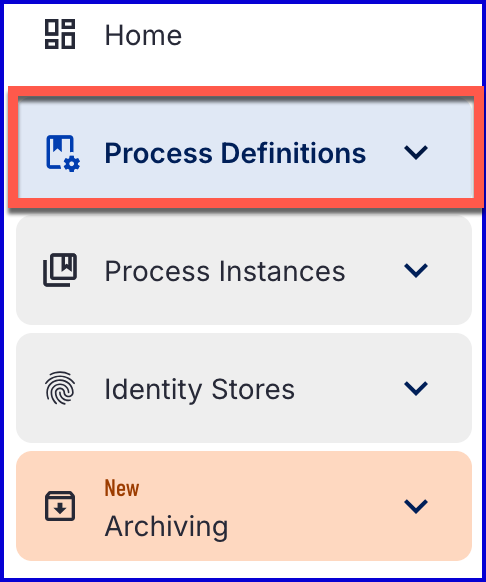
To create a new Process Definition in the Backoffice application, navigate to the 'Process Definitions' section using the left-side vertical menu.
On the Process Definitions page, select the 'New Process Definition' button at the top-right of the screen. A popup modal will appear where a new Process Definition can be created from scratch, uploaded from a file or using one of the existing templates.
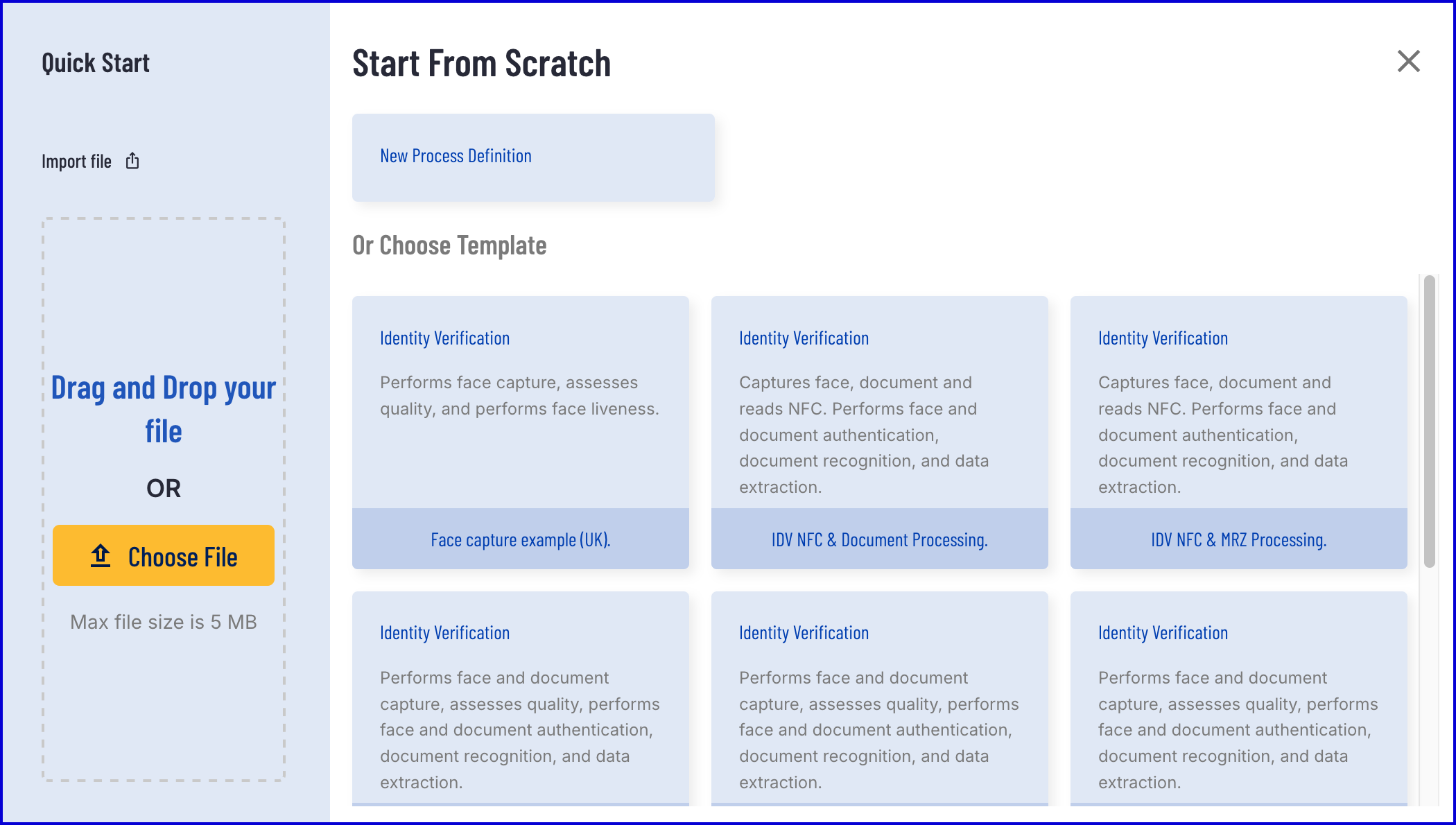
This example will create a new Process Definition from scratch. Click the 'New Process Definition' button to create a new Process Definition.
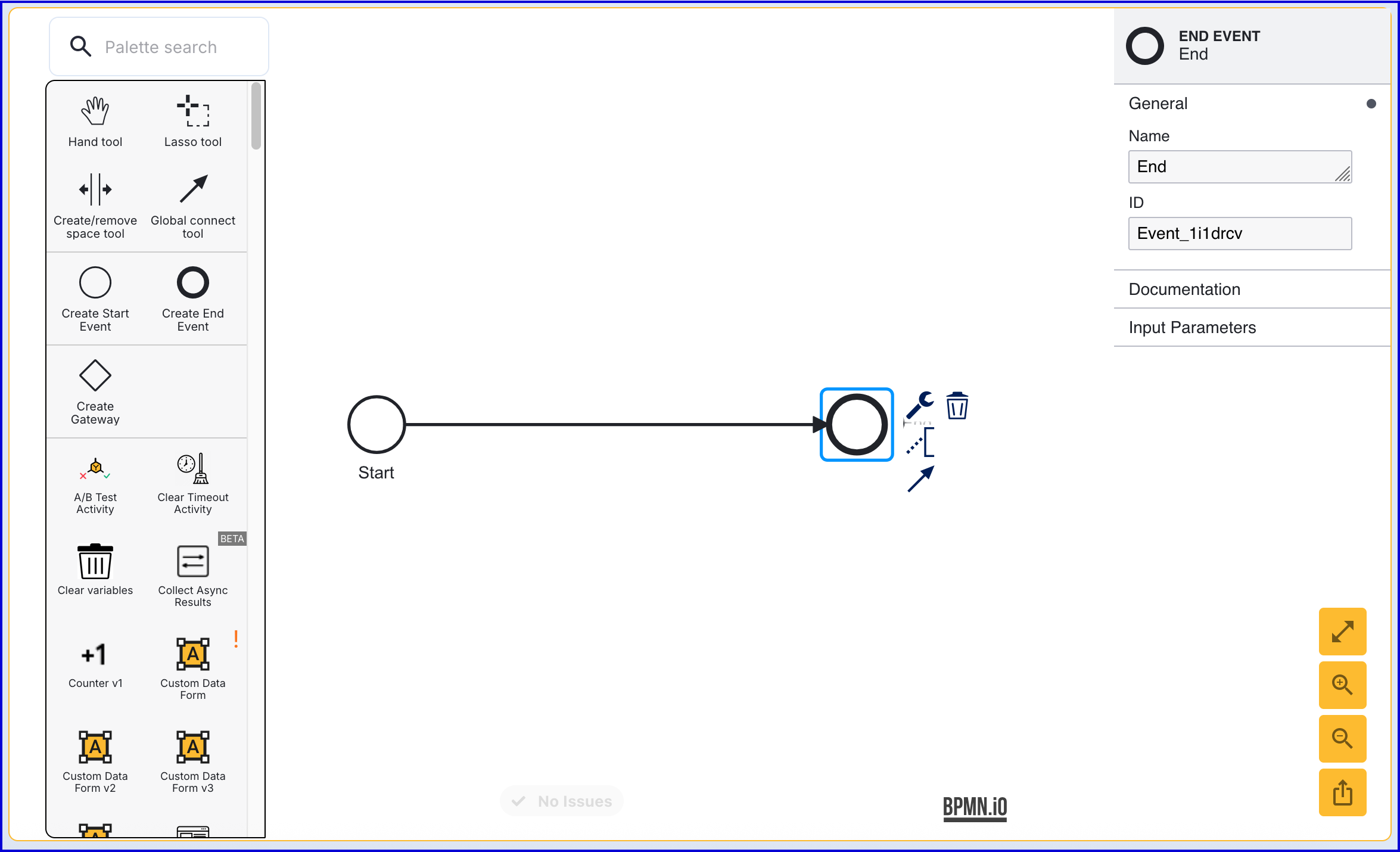
The Process Designer enables users to add activities to defined their process flow. To begin, add a 'Start' and 'End' event to the Process Designer.
Get Audio Chunk
The 'Get Audio Chunk' activity waits for a new audio chunk to become available from a call and stores the chunk data reference in the call data.
After the 'Start' event, add a 'Get Audio Chunk' activity to the Process Designer. In this example, an 'Enter voice loop' is also added to mark the beginning of the voice flow.
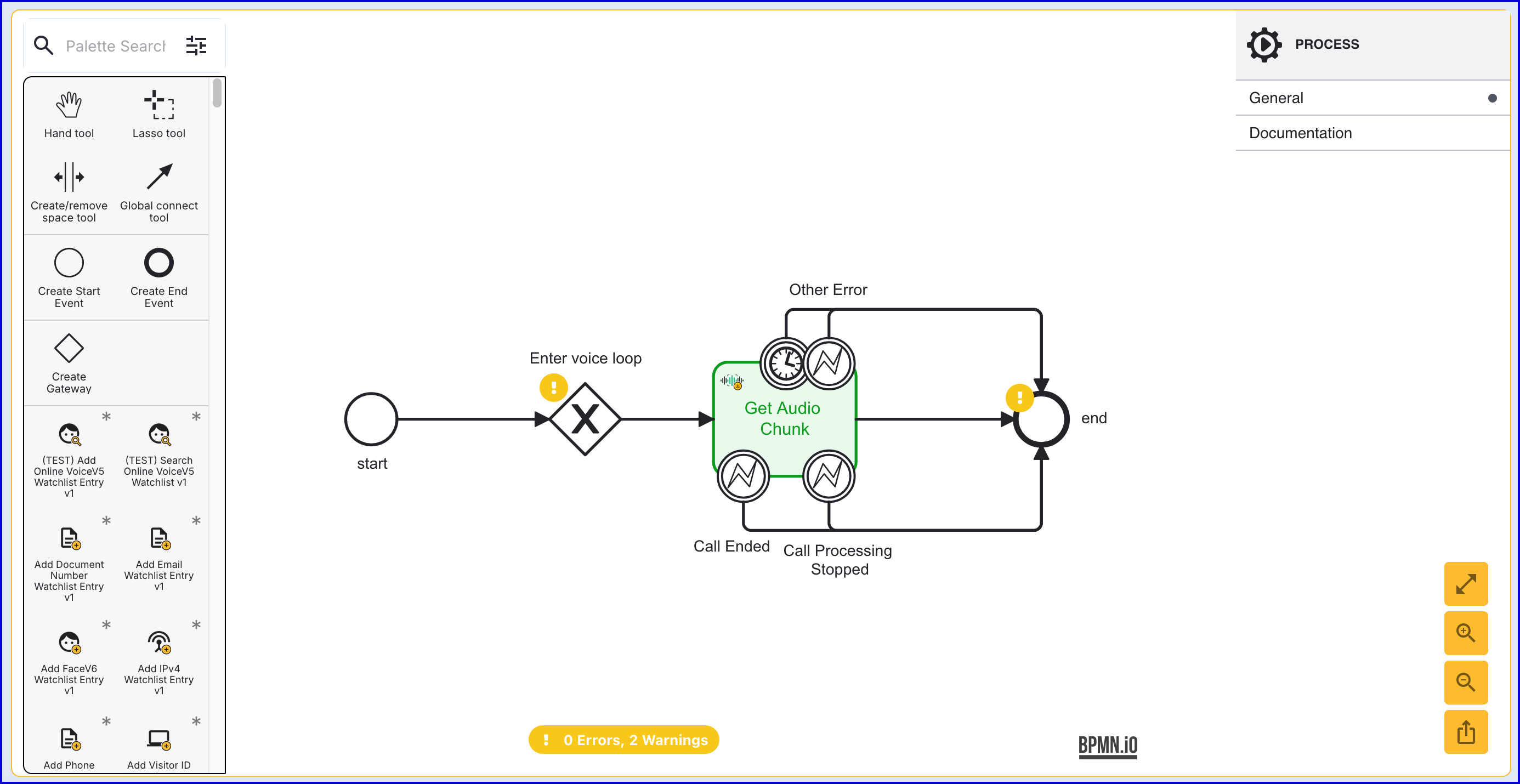
The 'Get Audio Chunk' activity supports the following input parameters:
Parameter Description Type Required Default Activity History Limit Sets a limit to how many activity history entries are generated by this activity given it could be called many times in a call. Setting to zero disables activity history publishing. Integer Yes ${5} Call ID Unique call identifier supplied by the telephony system. String No Call Key The TrustX reference key for this call. All process data related to a call is referenced by this key. String Yes call1 Polling Error Retry Count Number of poling retries before failure. Integer Yes ${5} Polling Interval Wait between poll attempts for audio. Integer Yes ${500} Wait Time WNumber of seconds to wait for a new audio chunk before timing out. Integer Yes ${240} The activity also includes the following error boundary events:
Event
Description
Timeout
Activity not continued.
Call Ended
Call ended, no more voice processing required.
Call Processing Stopped
Call processing was explicitly stopped, no more voice processing required.
Other Error
Call not found.
Perform xDeTECH Analysis
After retrieving the audio, xDeTech analysis of the audio contents can be performed using the 'XDeTECH Analysis' activity.
After the 'Get Audio Chunk', add the 'XDeTECH Analysis' activity and connect them using the sequence flow arrow tool.
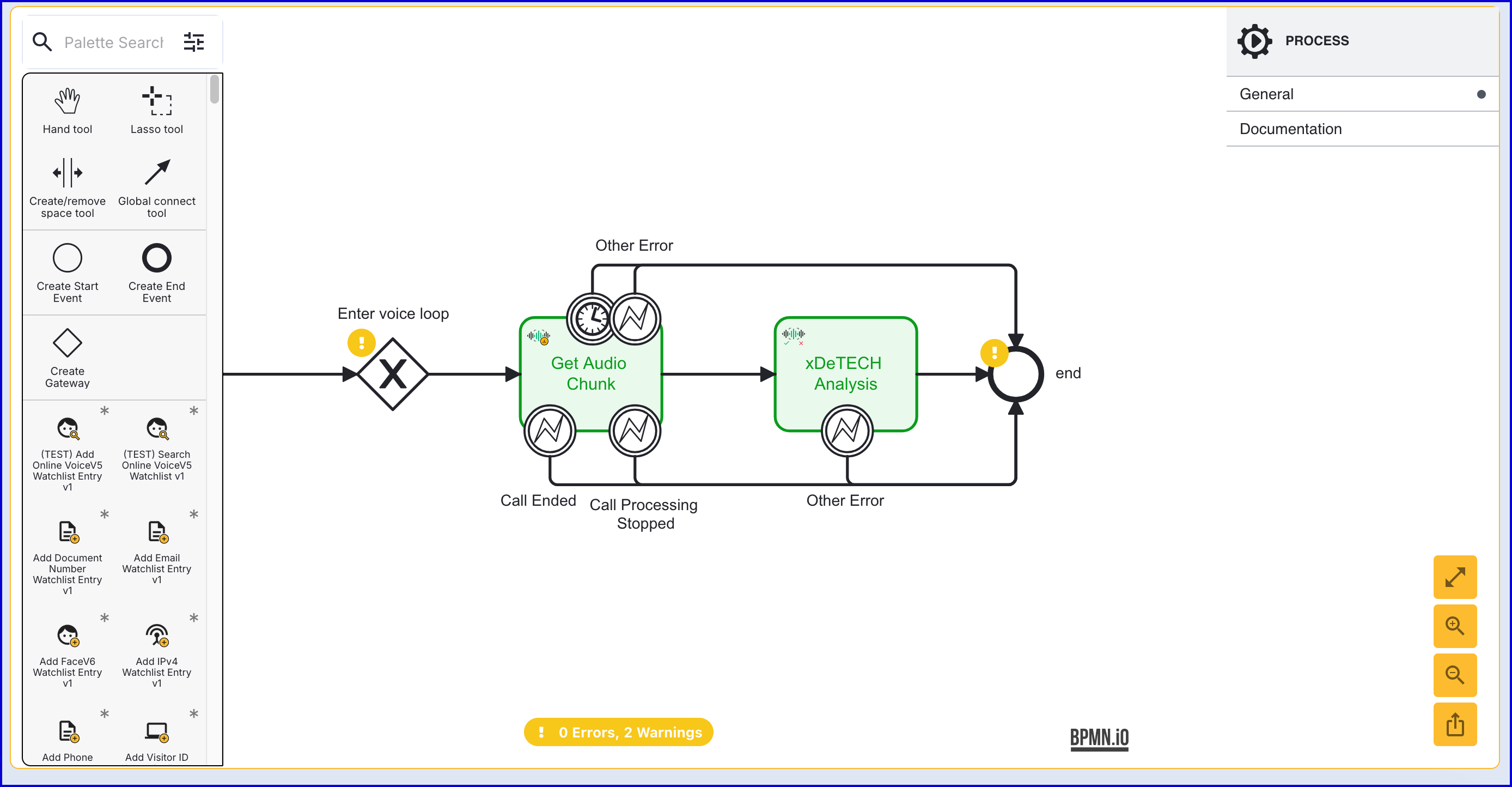
The 'XDeTech Analysis' activity supports the following input parameters:
Parameter Description Type Required Default Activity History Limit Sets a limit to how many activity history entries are generated by this activity given it could be called many times in a call. Setting to zero disables activity history publishing. Integer Yes ${5} Call Key The TrustX reference key for this call. String Yes call1 Operation Key The key for this xDeTech operation. String Yes op1 Service Policy Configuration policy for the service defined by the customer. String No op1
(Optional) Is Anomaly Detected Condition
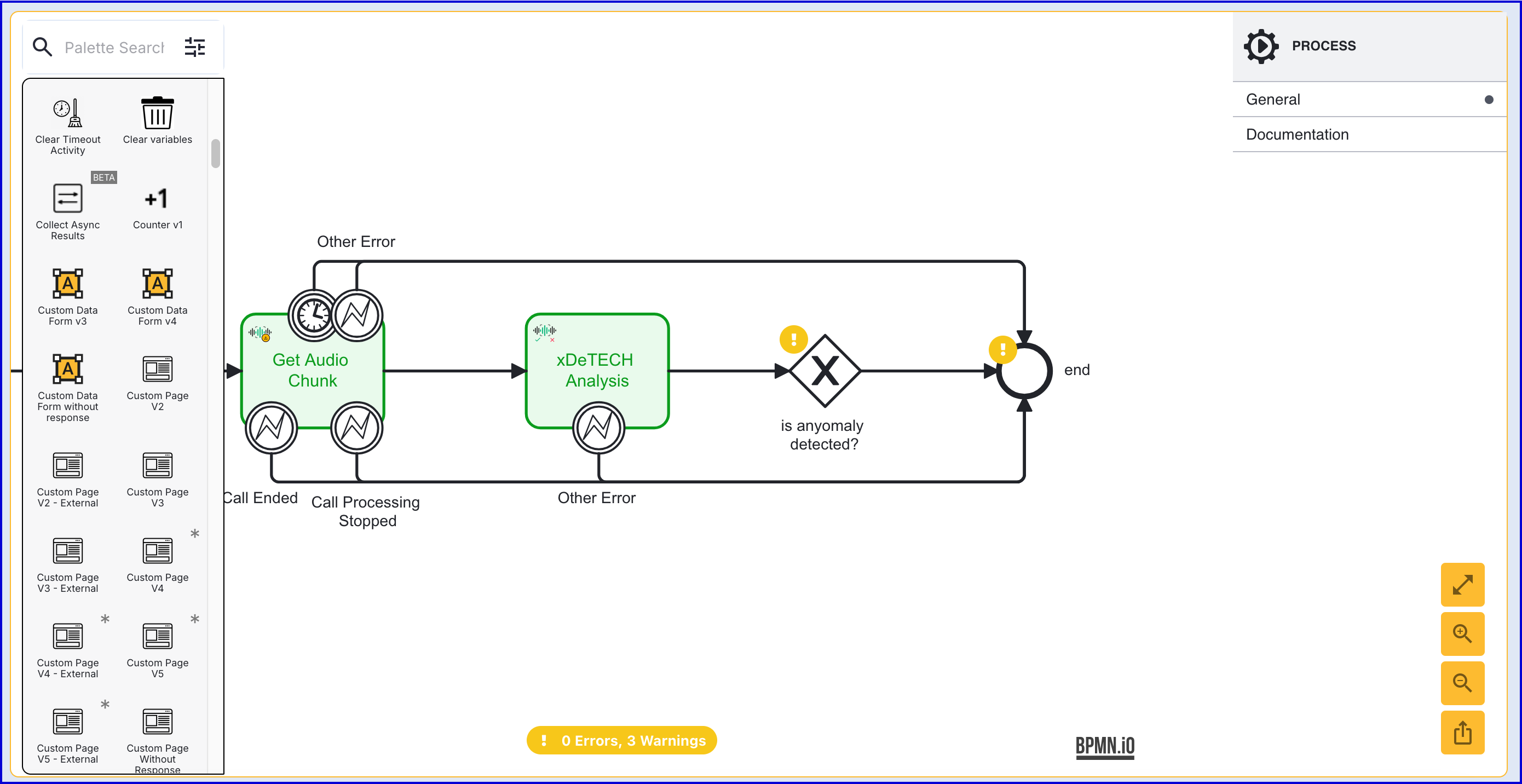
In the event that an anomaly is detected after the xDeTECH analysis, conditional logic can be configured either to continue with voice enrollment or delete the voice enrollment accordingly. This section will describe how to configure such logic by retrieving the currentExecutionData from the xDeTECH results.
Add a gateway after the 'xDeTECH Analysis' activity and connect it to the 'xDeTECH Analysis' activity.
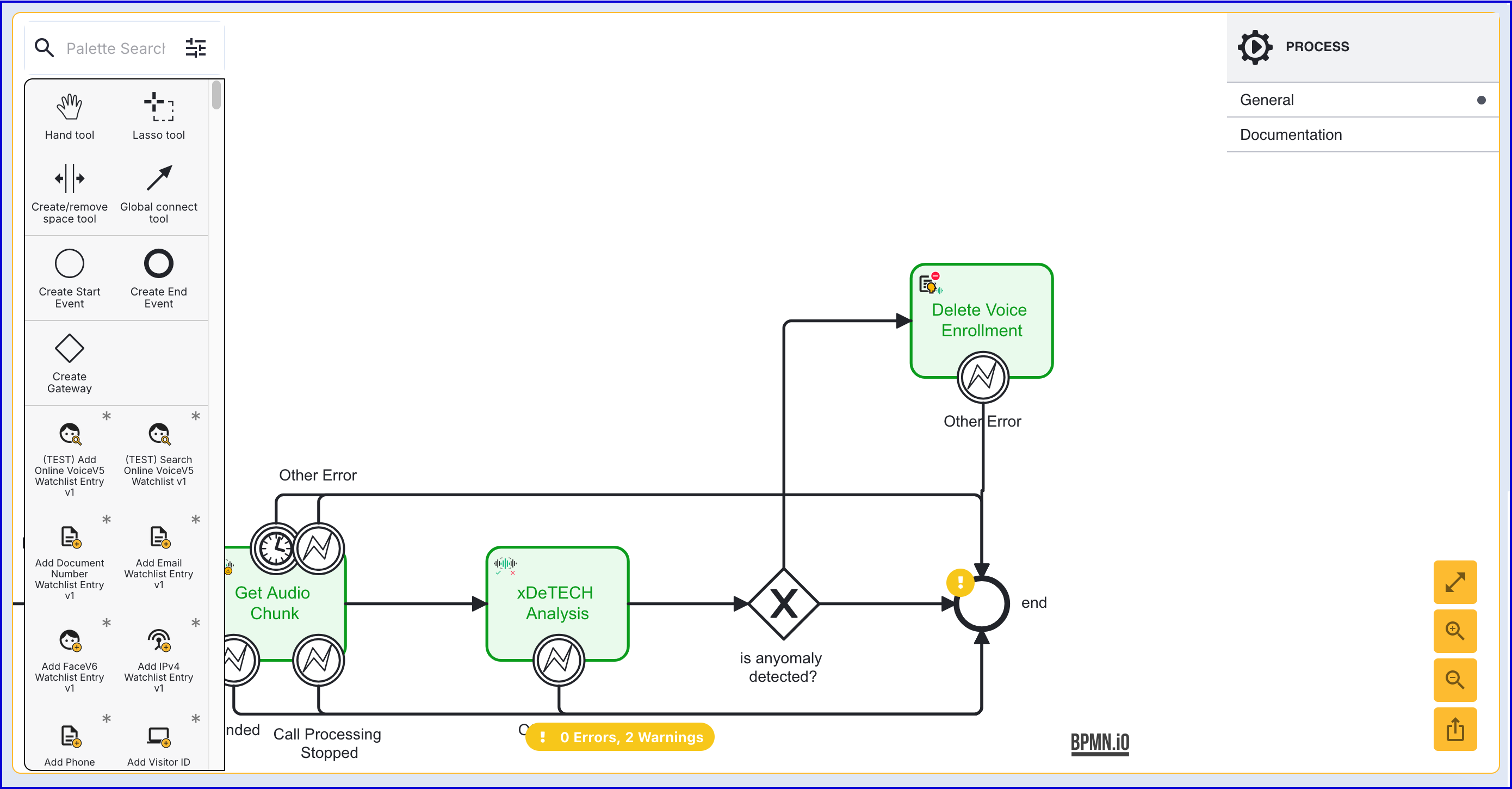
After the new gateway, add a 'Delete Voice Enrollment' activity and connect them using the global connect tool. This will serve as the flow when an anomaly is detected.
Select the arrow connecting the gateway to the activity. This will open the right-side contextual menu. Expand the list of 'Conditional' options and enter the following 'Expression':
${_identityStore.calls.call1.XDeTech.op1.currentExecutionData.result.outcome == 'ANOMALY_DETECTED'}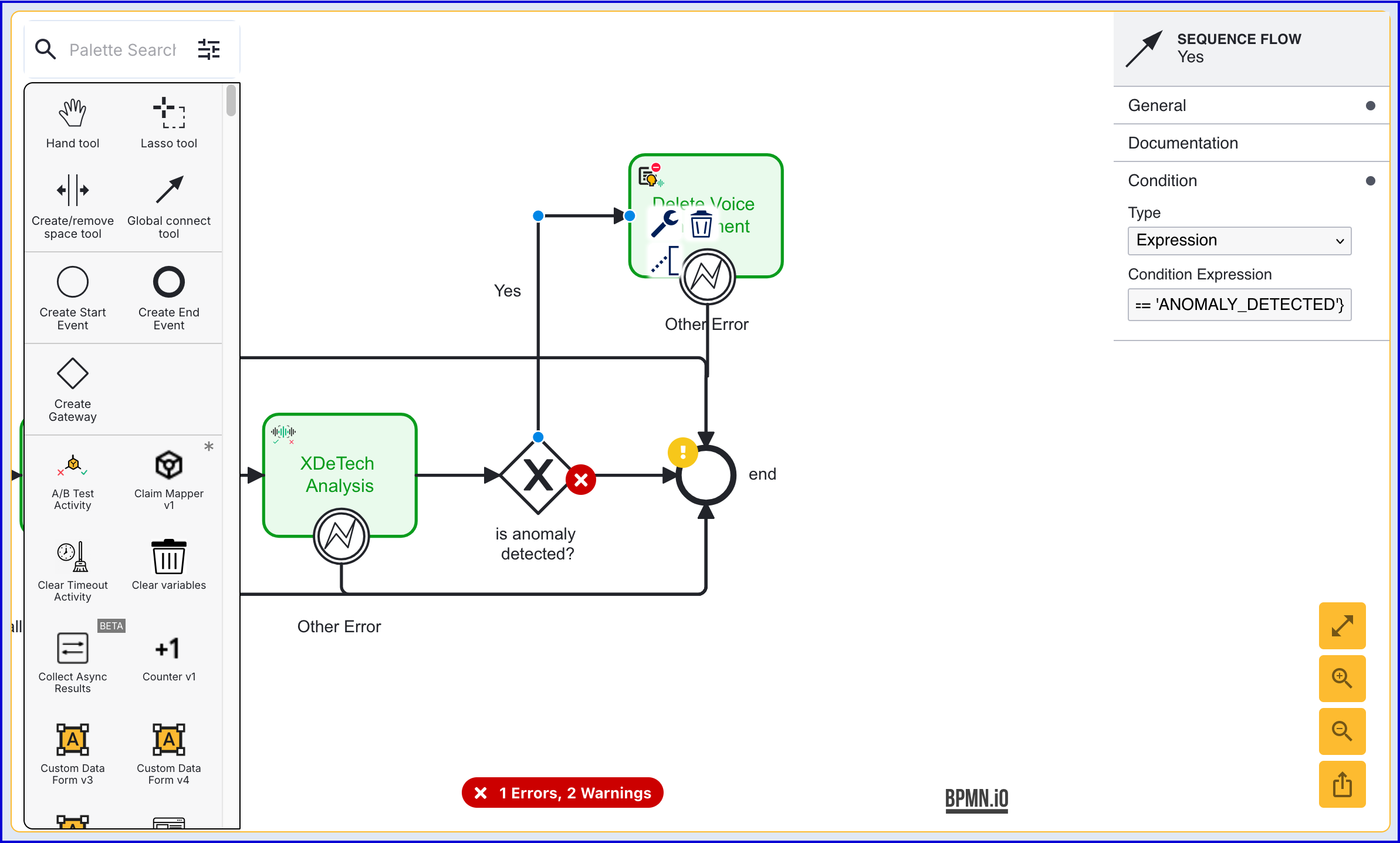
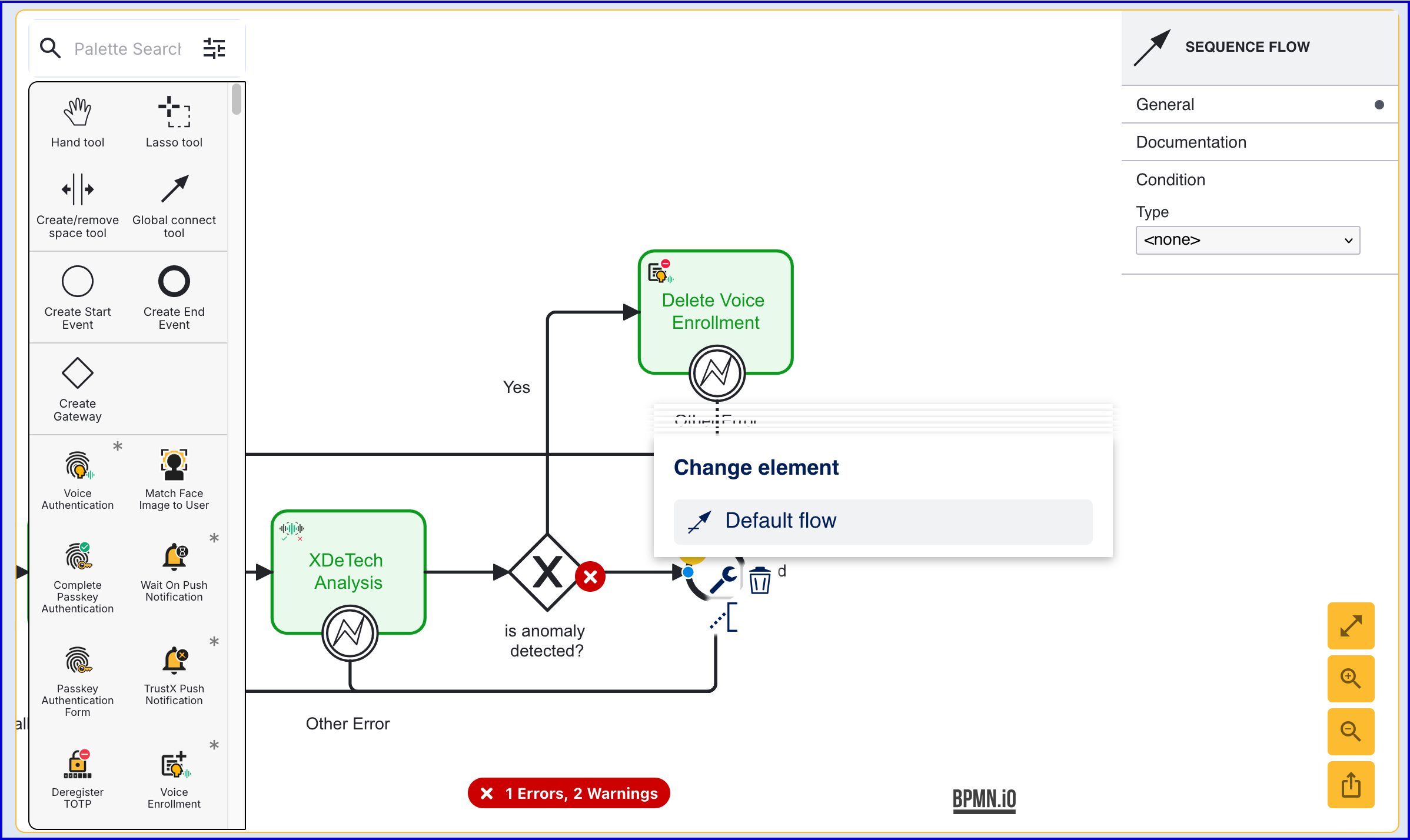
The Process Designer will show an error signalling that there is no default path for the Process Definition to take. To fix this error, select the sequence arrow connecting the gateway to the 'end' event. Click the 'Change Element' spanner icon and update the element to 'Default Flow'.
Voice Enrollment
After analysis is complete, voice enrollment can be completed using the 'Voice Enrollment' activity. If the optional steps outlined in the (Optional) Is Anomaly Detected Condition section, the default flow should be set between the gateway and the 'Voice Enrollment' activity.
Add the 'Voice Enrollment' activity to the Process Designer and connect it to the flow accordingly.
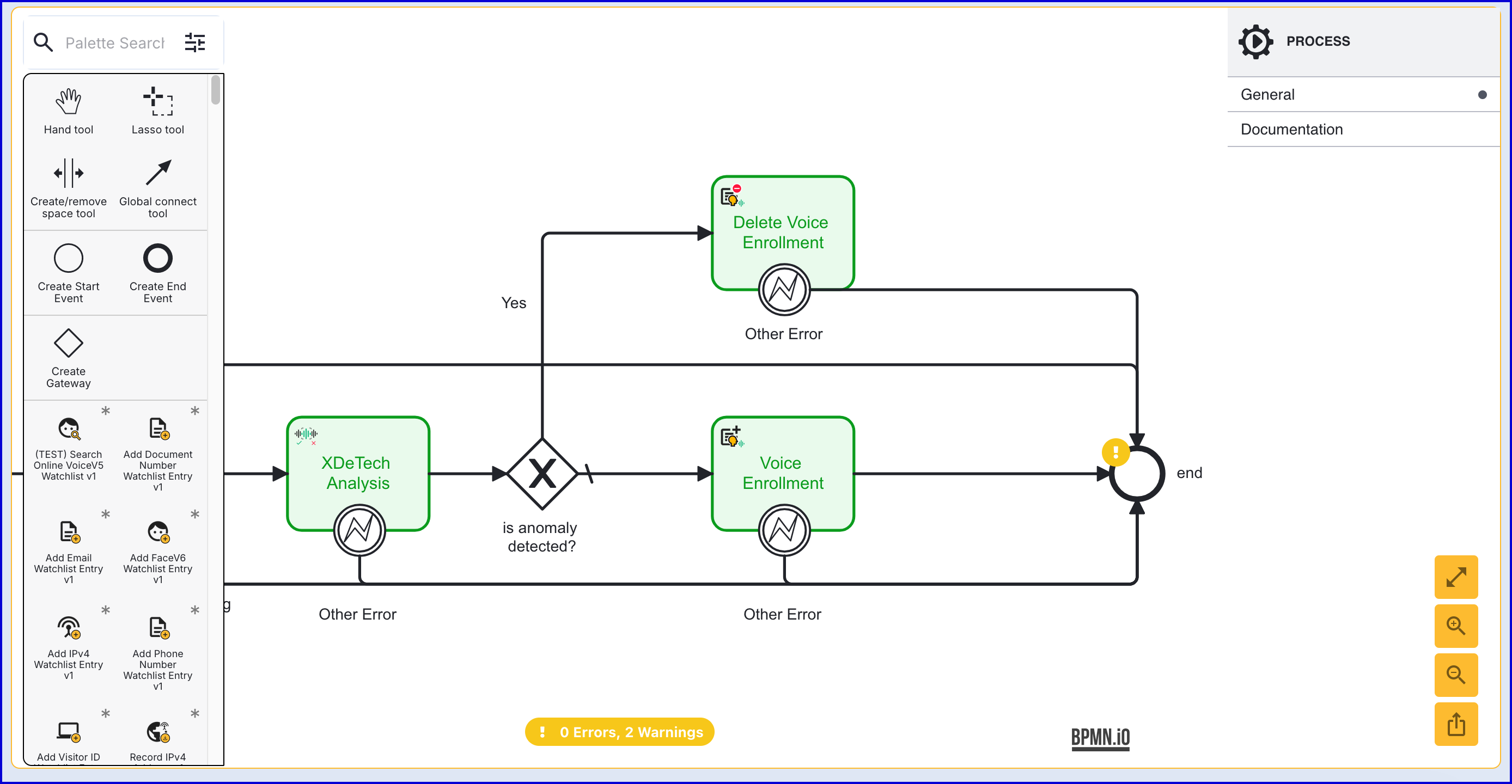
The activity includes the following input parameters:
Parameter Description Type Required Default Activity History Limit Sets a limit to how many activity history entries are generated by this activity given it could be called many times in a call. Setting to zero disables activity history publishing. Integer Yes ${5} Call Key The TrustX reference key for this call. String Yes call1 Create User If present and true, activity will call ID Store API which creates a user with ext id = caller id from call private attributes (must be set from agent UI). If null or false, activity will call ID Store API with ext id = caller id from call private attributes and it will expect user like that exists. If not, error will be thrown. Boolean Yes ${false} Hold Duration Defines a length of time after which the Identity Store service must be called regardless of how much speech is in the combined QC template. String No PT5M Operation Key The key for this xDeTech operation. String Yes op1 Min Speech Enrol Defines how many seconds of speech is a minimum required in QC template to call ID Store for enrolment. Integer No ${2} Service Policy Configuration policy for the service defined by the customer. String No op1 Store Name The Identity Store containing the policy and user. String Yes User Key The TrustX reference key for the user. User will be stored in PI data under this key, once when it’s fetched from ID store. String Yes user1
Voice Authentication
This step involves authenticating a voice sample. A voice sample will be requested from the end-user and compared to the enrolled voice sample using the 'Voice Authentication' activity.
After the 'Voice Enrollment' activity, add the 'Voice Authentication' activity to the Process Designer.
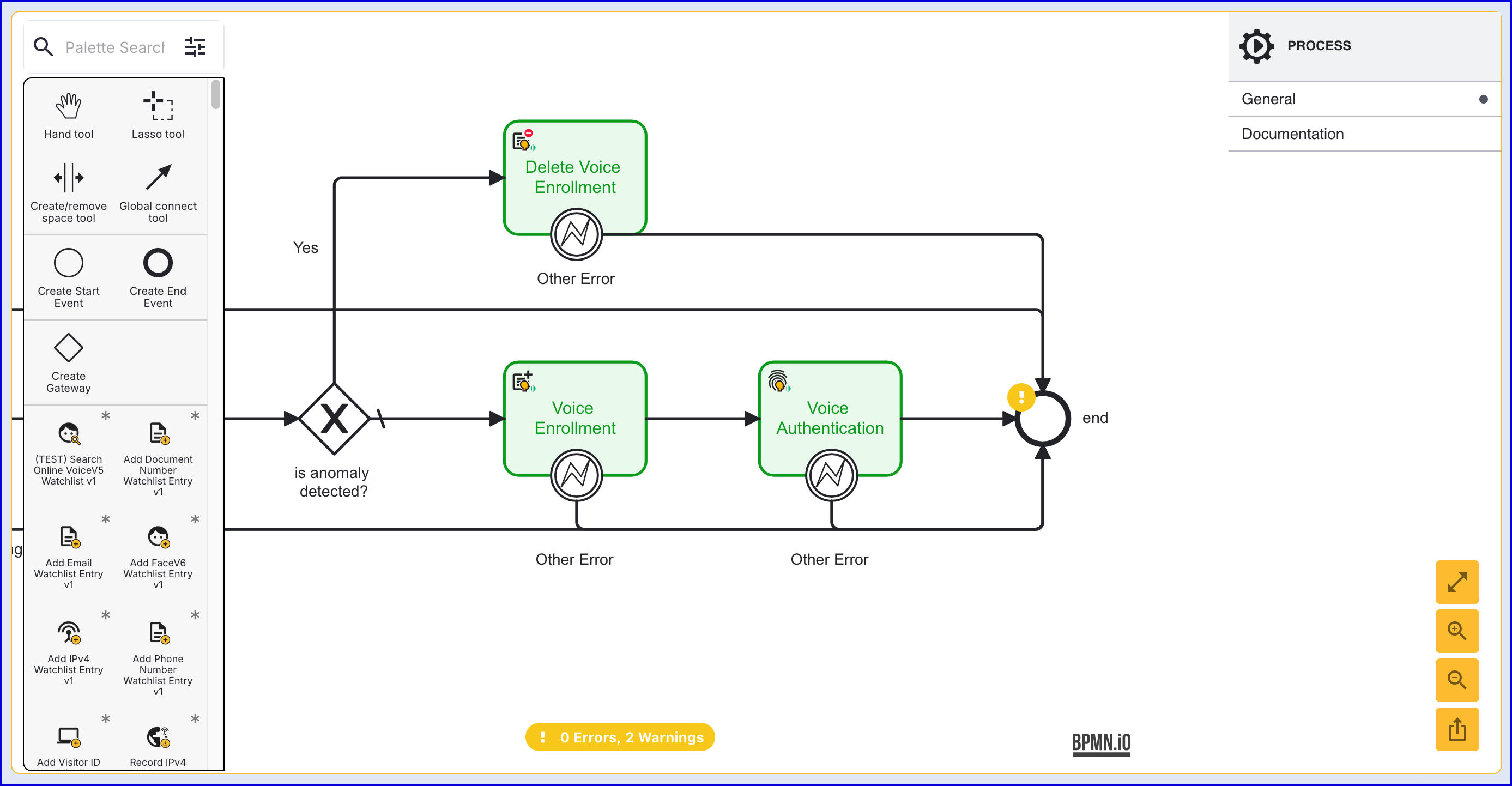
The activity includes the following input parameters:
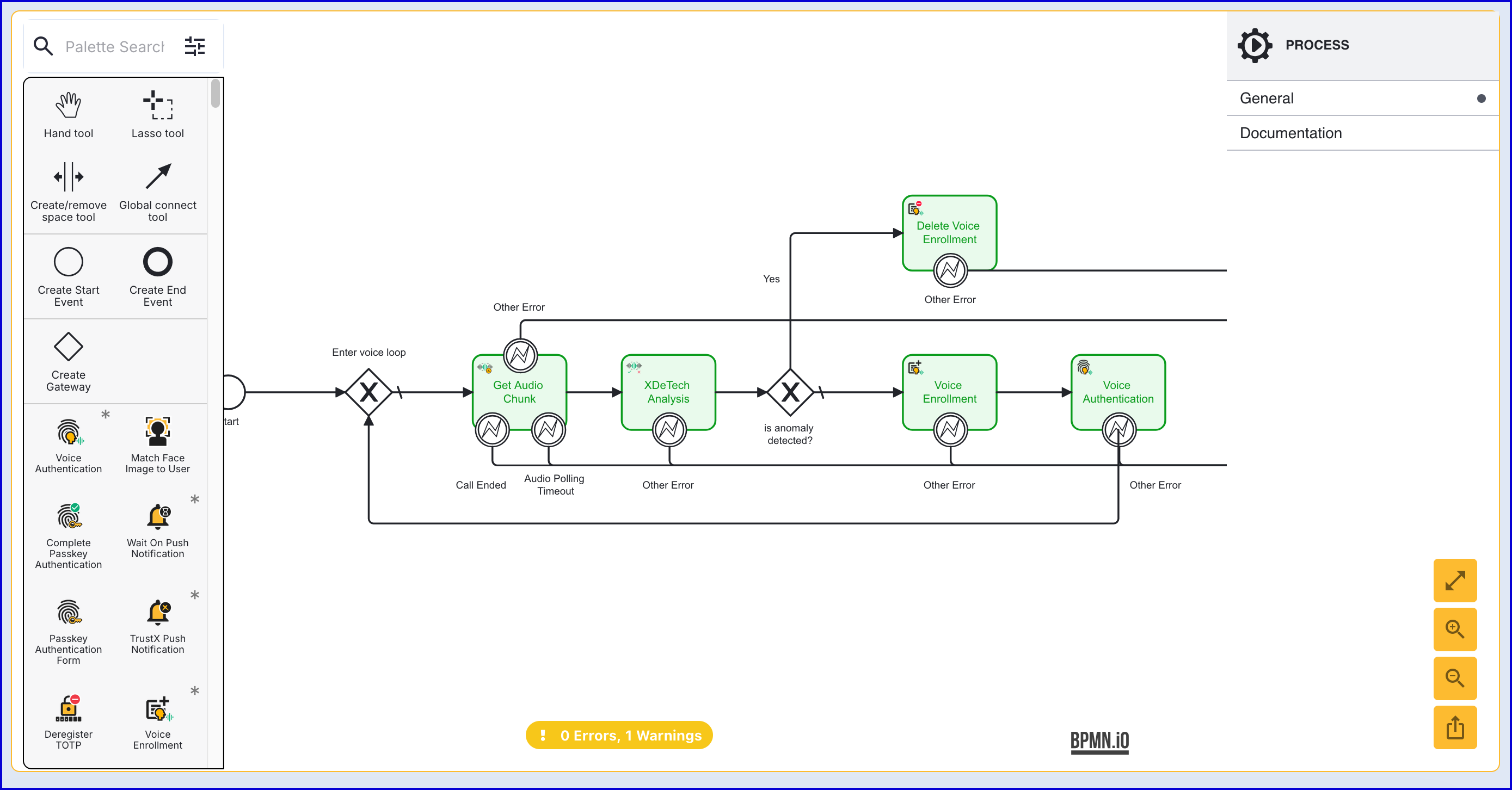
Parameter Description Type Required Default Activity History Limit Sets a limit to how many activity history entries are generated by this activity given it could be called many times in a call. Setting to zero disables activity history publishing. Integer Yes ${5} Call Key The TrustX reference key for this call. String Yes call1 Hold Duration Defines a length of time after which the Identity Store service must be called regardless of how much speech is in the combined QC template. String No PT5M Operation Key The key for this xDeTech operation. String Yes op1 Min Speech Enrol Defines how many seconds of speech is a minimum required in QC template to call ID Store for enrolment. Integer No ${2} Service Policy Configuration policy for the service defined by the customer. String No op1 Store Name The Identity Store containing the policy and user. String Yes User Key The TrustX reference key for the user. User will be stored in PI data under this key, once when it’s fetched from ID store. String Yes user1 Connect the 'Voice Authentication' activity back to the 'Enter voice loop' gateway at the beginning of the Process Definition.
Voice Quality and Insufficient Length
If the submitted audio source quality is poor (every chunk fails QC check) and / or if the audio source does not contain enough speech to call the ID Store to start authentication, no action will be shown in the Process Instance page and no check for voice authentication will be stored.
If the audio source is less than 20 seconds of speech and an authentication failure occurs, the authentication operation will remain "in progress" as there were not enough speech to complete authentication. In this case, checks will be stored with "NA" outcome.
If the audio source contains sufficient speech length to determine if authentication was successful, then checks will be stored with PASS or FAIL outcome and the Process Instance will be accepted or declined (based on what the result of the authentication match was).
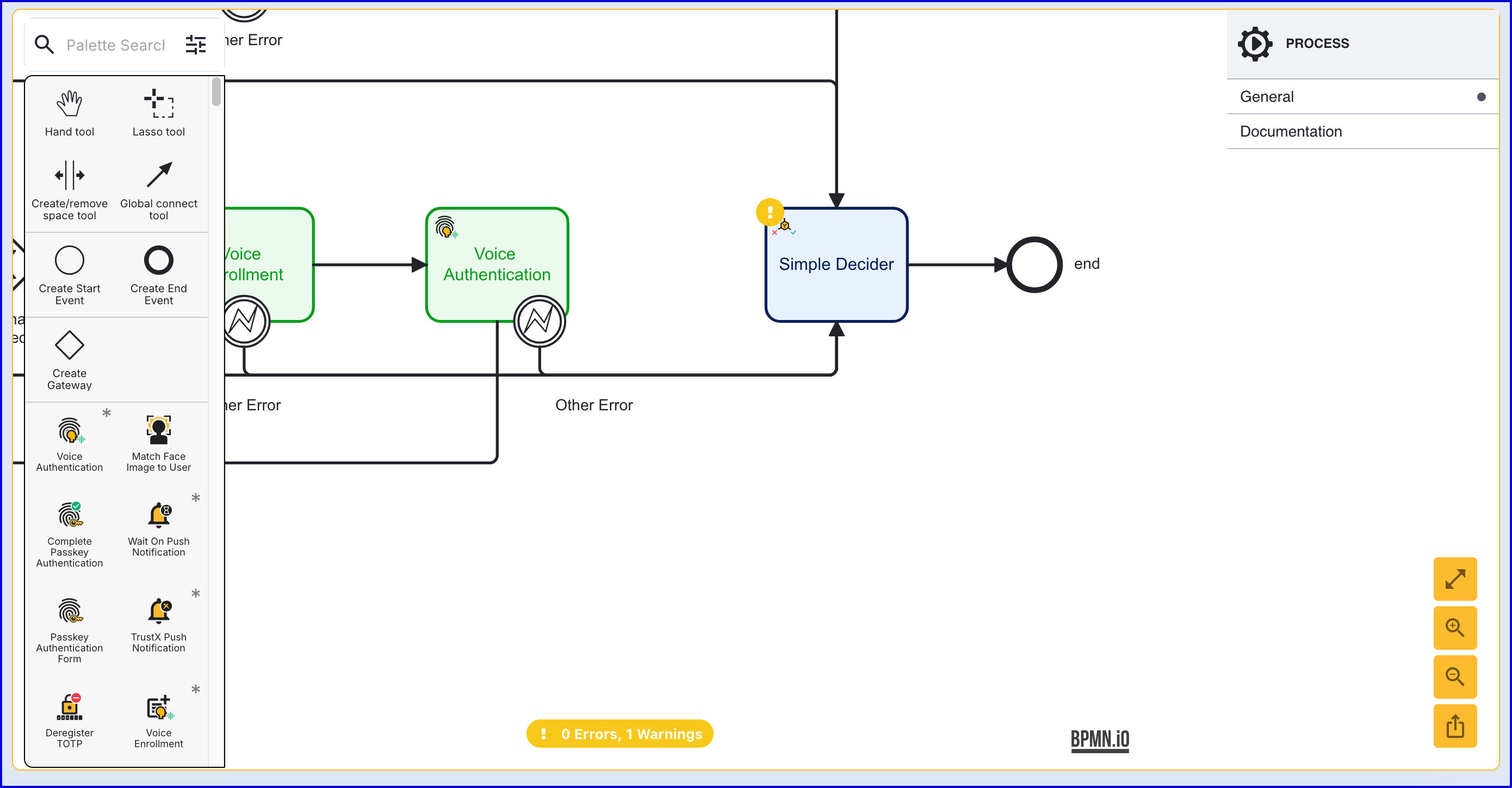
Add a Simple Decider
After the 'Voice Authentication' activity, a 'Simple Decider' activity will be used to determine a final decision on the Process Instance.
Add a 'Simple Decider' activity after the 'Voice Authentication' activity and use the Global connect tool to connect them.
Connect remaining error boundary events to the 'Simple Decider'
Finalize and Save the Process Definition
Once the Process Definition is defined, click the 'Save & Deploy' button to finalize the configuration.

Test Voice Authentication Flow
Voice Authentication flows can be tested using the Voice Call Emulation feature available from the Backoffice. This feature enables users to capture a voice recording and start a Process Instance using a chosen Process Definition. For more information, see the Voice Call Emulation guide for further information on utilizing this feature.
Call authentications will be stored as check results in the 'Call' section of a Process Instance. To find this information in the Backoffice, follow the steps outlined below:
Navigate to the Process Instances page found in the left-side bar.
Use the available search filters to find the Process Instance that integrates voice authentication.
Find the 'Calls' heading from the individual Process Instance page.
Example:
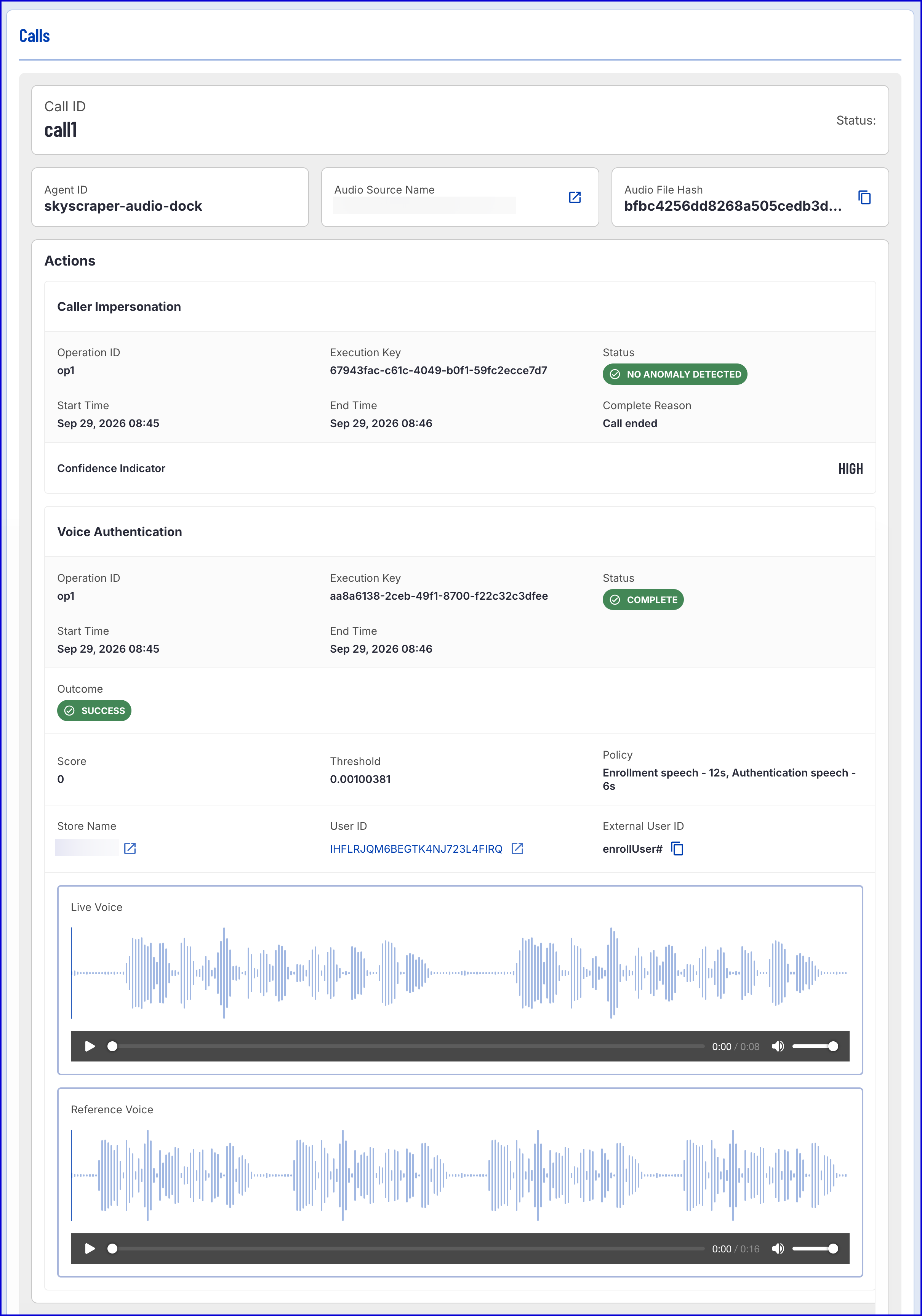
The Calls summary provides the following information:
General
Name | Description |
|---|---|
Call ID | The ID of the call. |
Agent ID | The ID of the agent. |
Audio Source Name | The name of the audio source. See Voice Call Emulation for more information on audio sources. |
Audio File Hash | Has code representation of the audio file. |
Caller Impersonation
Name | Description |
|---|---|
Operation ID | A unique ID of the operation defined by the TrustX call process. |
Execution Key | A unique ID of an execution of this action within the TrustX call process. |
Start Time | The time action processing started. |
End Time | The time action processing completed, either naturally or for the reason indicated. |
Status | This is a common field but its possible values depend on the operation - see below. |
Completed Reason | If the action ended naturally, this field will be "Call Ended". If the action was ended for another reason, the responses will be:
|
Error Code | The error code if an action completed due to an error. |
Error Message | The error message if an action complete due to an error. |
Statuses
Status | Description |
|---|---|
Not Processed | Not enough quality audio obtained for processing to begin. |
No Anomaly Detected | No issue with the audio processed so far. |
Anomaly Detected | A possible anomaly (replay/clone) has been detected. |
Error | An error occurred while processing. |
Confidence Indicator
Name | Description | |
|---|---|---|
High | Indicates a high level of confidence in the result. | |
Medium | Indicates a medium level of confidence in the result. |
Voice Enrollment
Name | Description |
|---|---|
Operation ID | A unique ID of the operation defined by the TrustX call process. |
Execution Key | A unique ID of an execution of this action within the TrustX call process. |
Start Time | The time action processing started. |
End Time | The time action processing completed, either naturally or for the reason indicated. |
Status | The status of the voice enrollment process. Can be one of three values:
|
Speech Enrolled | The total amount of speech enrolled in seconds. |
Store Name | The name of the Identity Store containing the authenticated User. |
User ID | Internal Identity Store ID of the authenticated User. |
External ID | External Identity Store ID of the authenticated User. |
Reference Voice | The reference voice sample. |
Voice Authentication
Name | Description |
|---|---|
Operation ID | A unique ID of the operation defined by the TrustX call process. |
Execution Key | A unique ID of an execution of this action within the TrustX call process. |
Start Time | The time action processing started. |
End Time | The time action processing completed, either naturally or for the reason indicated. |
Status | The status of the voice authentication process. Can be one of three values:
|
Outcome | Indicates whether the authentication succeeded or failed:
|
Score | The authentication score achieved: 0-1. |
Threshold | The authentication success threshold: 0-1. |
Policy | The authentication policy which is desribed based on how many seconds of speech was enrolled and how many seconds of speech was captured for authentication. |
Store Name | The name of the Identity Store containing the authenticated User. |
User ID | Internal Identity Store ID of the authenticated User. |
External ID | External Identity Store ID of the authenticated User. |
Reference Voice | The reference voice sample. |
Live Voice | The live voice sample. |